How to find every subscription you're paying for (the 20-minute audit)
You can find every subscription you're paying for in about twenty minutes, without connecting your bank, using three sources you already have: your app stores, your email, and one card statement. Most people who do this find at least one charge they'd completely forgotten — and the average household is quietly spending around $273 a month on subscriptions (West Monroe).
Why a deliberate audit beats guessing
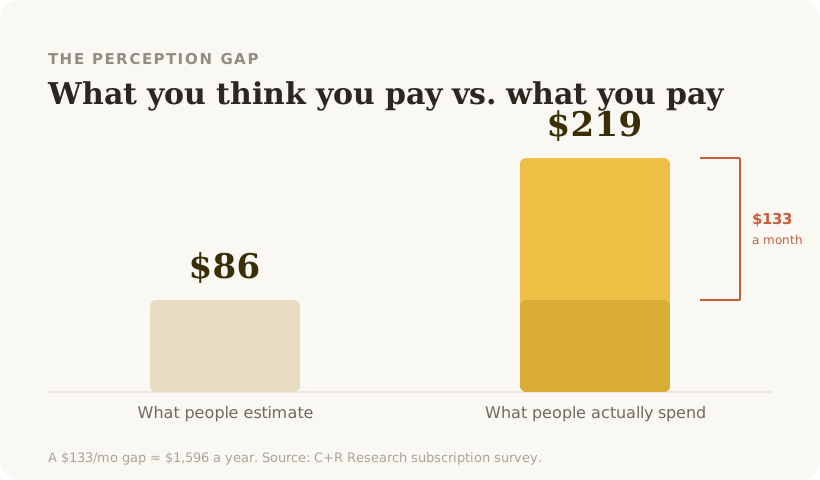
Estimating doesn't work. People guess about $86/month and actually spend around $219 (C+R Research), because charges are scattered across dates, cards, and app stores and never appear in one place. The audit's whole job is to pull them into a single list so the total becomes real. Budget the time once; a focused review realistically surfaces $50–100/month in cuttable spend.
Step 1 — Check your app-store subscriptions (5 min)
A large share of subscriptions bill through Apple or Google, where they're easy to miss.
- iPhone/iPad: Settings → tap your name → Subscriptions.
- Android: Play Store → profile icon → Payments & subscriptions → Subscriptions.
Write down every active one with its price and renewal date.
Step 2 — Search your email (8 min)
This is the highest-yield step, because almost every subscription emails you a receipt. Search your inbox for each of these terms and skim the results:
receiptrenews/your subscriptionfree trial/trial endingpayment/invoice- the names of tools you suspect (Netflix, Spotify, ChatGPT, Adobe, iCloud…)
Receipts and renewal notices are the most reliable record you have — they show the exact amount and the next billing date. Pay special attention to trial ending emails: 48%+ of people have been charged after forgetting to cancel a trial (C+R Research).
Step 3 — Scan one card statement (4 min)
Open last month's statement (and one from ~11 months ago, to catch annual renewals). Look for recurring, identical amounts — the tell-tale signature of a subscription. Add anything the first two steps missed.
Step 4 — Total it and decide (3 min)
Put everything in one list: name, price, renewal date. Then:
- Multiply the monthly total by 12. The annual number is the one that changes minds.
- Flag anything you haven't used in a month. Those are your first cancellations.
- Flag any two services that do the same job. Overlap is the most-missed waste — you use both, so neither looks cuttable, but you rarely need both.
Keeping it from creeping back
The reason this problem returns is that after the audit, charges go back to being silent and scattered. Households add about 2.5 subscriptions a year while cancelling only ~1.2 (West Monroe), so the list quietly grows again. The durable fix is a standing view of your true total plus a heads-up before each renewal — so every charge is a choice, not a surprise.
Pip reads your email receipts to show everything you pay for, flags overlap and price rises, and warns you before charges hit. No bank needed.
Join the Beta →