How to track subscriptions without connecting your bank
You can track every subscription you pay for without ever linking a bank account. Most popular subscription apps ask for a bank connection to find charges — but there's a private alternative that still discovers what you forgot: your email receipts. Here's how the no-bank options compare, and how to get automatic discovery without handing over your financial login.
Why people want to skip the bank link
Bank-connected trackers (like the big all-in-one money apps) work by reading your transactions. That's powerful, but it comes with real friction: you're granting a third party access to your entire financial life just to manage subscriptions, and the most useful features often sit behind a paid plan. For a lot of people it feels like too much surveillance for too small a job.
The good news: you have three no-bank paths, and they're not equal.
Option 1 — Manual tracking (private, but blind)
Apps like Bobby, Subby, and similar let you log subscriptions by hand with no bank connection at all. You type in each service, its price, and its renewal date.
- Pro: completely private; nothing is connected.
- Con: it can only show you what you remembered to enter. It can't discover the trial you forgot or the annual renewal from eleven months ago — which are exactly the charges worth catching. You've traded a privacy concern for an effort problem, and the subscriptions most worth finding are the ones you'd never think to add.
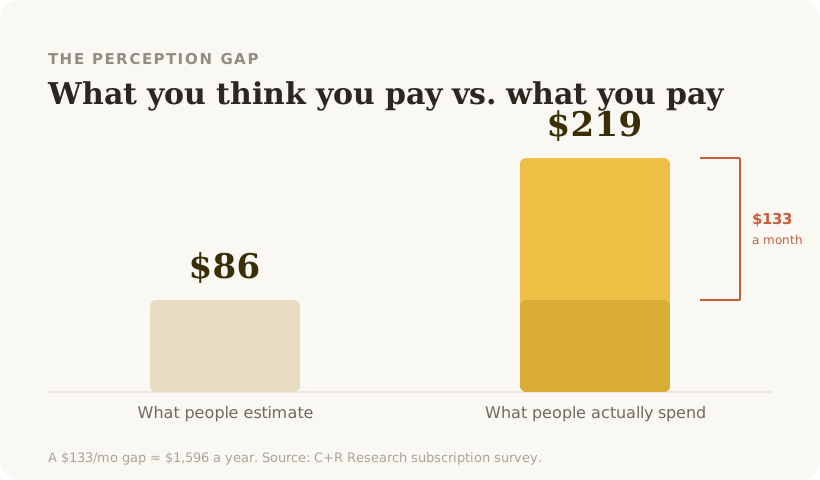
This is the core weakness of manual tracking: 42% of people are paying for something they've forgotten (West Monroe), and a manual app is blind to precisely those.
Option 2 — A statement scan (one-time, not ongoing)
You can download a card or bank statement as a file and read through it yourself, or upload it to a tool that flags recurring charges. This finds forgotten charges without a live bank link.
- Pro: catches what manual entry misses; no persistent connection.
- Con: it's a snapshot, not a system. You have to repeat it manually, and it won't warn you before the next renewal.
Option 3 — Email-first tracking (automatic and private)
Here's the path most comparisons miss. Almost every subscription sends an email — a welcome message, a receipt, an invoice, a "your trial is ending" notice, a renewal confirmation. An email-first tracker reads those receipts to find your subscriptions automatically, the same way a bank-based app reads your statement, but without ever touching your bank login.
- Pro: automatic discovery like a bank tracker, privacy like a manual app. It finds the trials and annual renewals you forgot, and it can warn you before a charge lands.
- Con: it needs read access to your email receipts (not your money) — a very different trust ask than your bank credentials.
This is the best of both worlds: you get the discovery that makes tracking actually useful, without the financial-surveillance tradeoff.
Which should you choose?
- Want maximum privacy and don't mind blind spots → manual.
- Want a quick one-time reality check → statement scan.
- Want automatic, ongoing tracking that catches what you forget, without a bank link → email-first.
For most people, email-first wins, because the whole point of a tracker is to surface the charges you don't already know about — and only automatic discovery does that.
Pip reads your email receipts to show everything you pay for, flags overlap and price rises, and warns you before charges hit. No bank needed.
Join the Beta →